
A business credit account not showing on Experian may mean the provider does not report to Experian, the reporting cycle has not finished, or the account information has not matched your company’s credit file. The account could also appear under an industry category instead of the vendor’s name.
You opened an account, bought something your business needed, and paid the invoice. Naturally, you expected to see that payment on your business credit report.
When nothing appears, it can feel as though your effort—and perhaps the account fees—accomplished nothing.
Before opening another account, find out what happened to the one you already have. A missing entry does not automatically mean you paid incorrectly or that your business credit profile is damaged.
This guide walks you through what to check, what to ask your provider, and when to contact Experian.
First, Confirm Which Experian Report You Are Checking – Why Is My Business Credit
Start with a simple question: are you reviewing your business credit report or your personal credit report?
Experian’s small-business reporting service is separate from its personal credit service. Looking at your personal report will not tell you whether a vendor account appears on your company’s commercial report.
Also check the date of the report. A previously downloaded PDF is a snapshot; reopening it will not show activity received after that report was generated.
Write down:
- Your company’s name and address on the report.
- The date the report was generated.
- The account you expected to see.
- The invoice date and cleared payment date.
- The provider’s stated reporting schedule.
If the difference between the two credit profiles is unfamiliar, read our guide to business credit vs. personal credit.
Business Credit Account Not Showing on Experian? Here’s What to Check
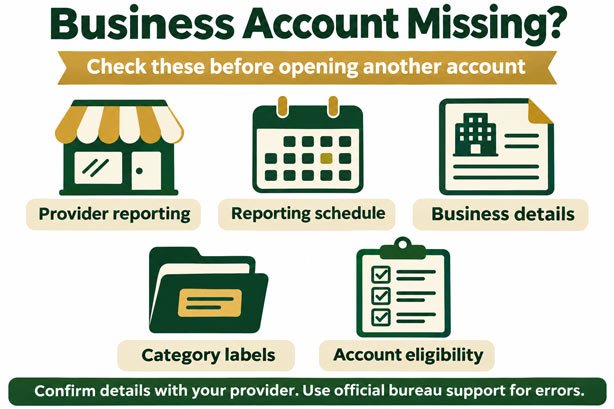
The Provider Does Not Report to Experian
Offering business payment terms and reporting those payments are separate services.
Experian explains that not every supplier contributes payment history to its business reporting system. An account’s absence may simply reflect the supplier’s reporting arrangements.
Do not rely on a general statement such as “helps build business credit.” Ask whether your specific account type currently reports to Experian Business.
Before paying for an account primarily for credit-building purposes, get that answer in writing.
Your Payment Has Not Reached the Reporting Cycle
Your payment date, the provider’s submission date, and the date information becomes visible are different milestones.
For example, Brex says it reports the previous month’s payment history at the beginning of the following month. It also explains that the receiving bureau determines how quickly the information appears. That is Brex’s process, not a universal schedule for every account.
Ask your provider for its actual schedule rather than assuming every payment should appear within 30 days.
Your Business Information Needs Attention
Compare the business name and address on your account with the details on your credit report.
Brex specifically warns that differences in these details can prevent its payment data from matching a business credit profile.
For your own review, check:
- Legal business name.
- Any trading name or DBA.
- Current and previous business addresses.
- Suite or unit number.
- Account number and business identifiers requested by the provider.
A difference is a reason to investigate, not proof that matching failed. Ask the provider or bureau to confirm whether a correction is necessary.
The Entry Is Listed Under a Category
Searching only for a supplier’s brand name can lead you to overlook an existing entry.
Experian explains that supplier information may appear under a business category rather than the supplier’s actual name.
Review the available account details before deciding the account is missing. If you cannot identify an entry confidently, request clarification instead of guessing.
Your Account May Have Provider-Specific Reporting Conditions
Ask whether reporting depends on a particular account type, eligible purchase, payment status, or other requirement.
Treat these as questions to verify with your provider. Do not assume that another company’s minimum purchase amount or reporting policy applies to your account.
If a sales page and a support response give different answers, ask the provider to explain which terms govern your account.
Source: Experian business credit report FAQs and Brex business credit reporting guidance.
Six Questions to Ask Your Vendor or Account Provider
A useful support request should establish what happened to a particular account and payment.
- Does my account type currently report to Experian Business?
- What conditions must be met before activity is reported?
- What is your reporting schedule?
- Was my account included in your latest submission?
- What business name and address were submitted?
- What should I do if the account still does not appear after your expected processing window?
Save the written response with your invoice and payment confirmation. It gives you something specific to reference if you need further help.
Email Template to Request Reporting Confirmation
Subject: Experian Business Reporting Confirmation — Account Ending [1234]
Hello [Provider Support Team],
I am reviewing the Experian business credit report for [Legal Business Name] and cannot identify my account.
My account ends in [1234]. Invoice [Invoice Number] was paid on [Date], and the payment cleared on [Date].
Please confirm whether this account type currently reports to Experian Business, whether my activity met your reporting requirements, and whether it was included in your latest submission.
Please also confirm the business name and address used for reporting and your recommended next step if the account remains missing.
Let me know if you require supporting documents and how I can submit them securely.
Thank you,
[Name]
[Business Name]
When Should You Contact Experian?

Contact Experian when you need help identifying an entry, correcting business information, or investigating an apparent reporting error.
Its current business support instructions direct report owners to the “Submit data dispute” function in their online report. Experian also provides an alternative route through its official support page if that option is unavailable. Use the Experian business report help page to find the appropriate channel.
Before submitting a request, organize:
- The relevant business credit report.
- The provider’s reporting confirmation.
- The invoice and payment receipt.
- Your business’s current and previous names or addresses, where relevant.
- A brief explanation of what you believe is missing or incorrect.
Keep the explanation precise. “The provider confirmed submitting this account, but I cannot identify it on the attached report” is more useful than “my business credit is wrong.”
Submit sensitive information only through a verified channel and provide the documents requested for your case.
How Long Should You Wait?
There is no single reporting deadline that applies to every business account.
Use your provider’s reporting schedule as the starting point. If its expected window passes, follow up with the submission details rather than repeatedly checking without new information.
A correction investigation is a separate process. Experian says investigations generally finish within 30 days, although complex cases can take longer. That is not a promise that a newly opened vendor account will appear within 30 days.
Source: Experian business report corrections and updates.
Keep a simple tracking record:
| Item | What to record |
| Account | Provider and last four account digits |
| Payment | Invoice number and cleared date |
| Reporting | Bureau, schedule, and confirmed submission date |
| Follow-up | Support reference and next agreed action |
| Resolution | Updated report date and outcome |
Mistakes to Avoid While Investigating
Opening More Accounts Before Understanding the Problem
Another account does not explain why the first one is missing. Review the existing account before adding fees or obligations.
Buying Products Only to Chase a Credit Entry
Evaluate whether purchases serve your business and whether the account’s costs make sense. Reporting alone should not replace that decision.
Disputing Accurate Information
An investigation should address a genuine question or error. Describe what you can document rather than requesting a particular score outcome.
Expecting a Guaranteed Score Increase
An account appearing and a score improving are different outcomes. Experian’s scoring considers multiple factors; payment history is only part of the picture. Learn more in our business credit score guide.
Frequently Asked Questions
Does a Net 30 account automatically report to Experian?
No. Net 30 describes a payment arrangement. Confirm separately whether the provider reports your account type to Experian Business and what conditions apply.
Should I check my personal Experian report for a vendor account?
Check the business report when investigating business reporting. Your personal report and your company’s commercial report serve different purposes.
Can an account appear without showing the vendor’s name?
Yes. Experian says supplier entries may display an industry category instead of the supplier’s name. Request help identifying an unfamiliar entry.
Should I open another account if this one is missing?
First establish whether the existing provider reports, whether your activity was submitted, and whether you are reviewing the correct file. Make any new account decision based on your business needs and the actual terms.
Get Help Understanding Your Next Step
A missing account is easier to investigate when you have the right records and specific questions.
Start with the provider’s reporting policy, confirm the submission, and review your business details. If something still appears wrong, use Experian’s official support process.
If you need help organizing your broader credit-building approach, explore BAG Credit Pros’ business credit building services. Our guidance can help you understand your foundations and plan practical next steps.
This article provides general business credit education. Reporting, corrections, score changes, and financing decisions depend on the relevant providers and credit bureaus.
